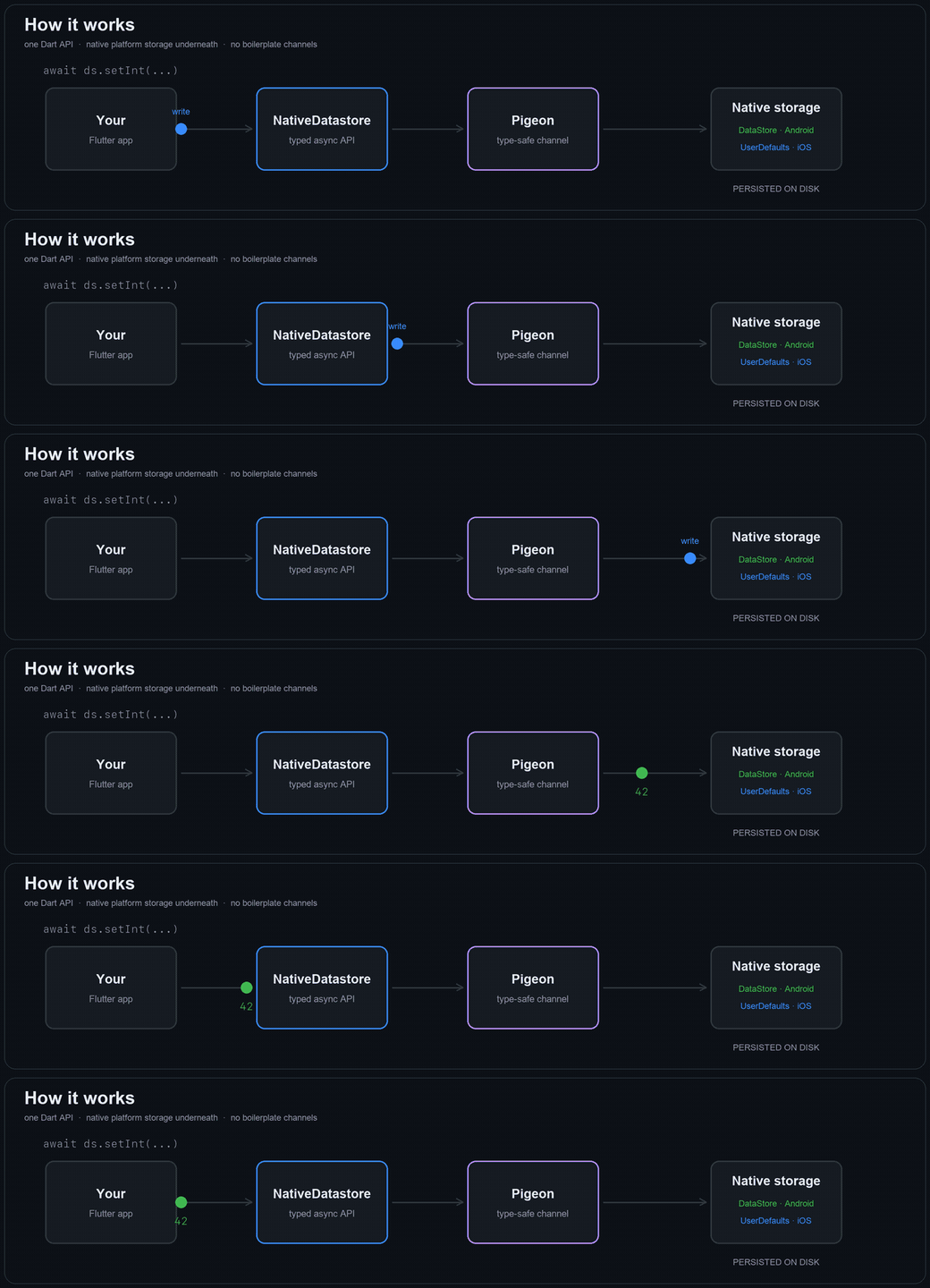
native_datastore is persistent key-value storage for Flutter — one async,
type-safe Dart API over Jetpack DataStore on Android and
UserDefaults on iOS. No method channels to hand-write, no setup files to edit.
The store is empty — every getter returns null. Run a write below.
This panel is backed by your browser's own storage, so
— the values are read back. On a device, DataStore and UserDefaults do exactly this job.
Why switch
SharedPreferences is the legacy path
Google's own guidance is to prefer DataStore. Here is what changes when you do.
Concern
SharedPreferences
native_datastore
Thread safety
Unsafe on the UI thread; can trigger ANRs
Fully async, coroutine-backed
Error handling
Fails silently
Typed NativeDatastoreException
Parsing errors
Throw at runtime
No runtime parse exceptions
Disk I/O
Blocking commit() or fire-and-forget apply()
One consistent async API
Type safety
Returns a default on type mismatch
Typed keys, checked at compile time
Concurrent writes
No transactional guarantee
Atomic read-modify-write
Already shipping shared_preferences? One call imports everything:
await ds.migrateFromSharedPreferences().
What you get
Eight types, two platforms, one API
Your Dart calls cross a generated Pigeon channel and land on whichever store the platform already recommends.
Native backends
Jetpack DataStore on Android, UserDefaults on iOS. No shim database, no reinvented storage format.
Eight supported types
String, bool, int, double, List<String>, Uint8List, DateTime, Map<String, dynamic> — each getter returns null when the key is absent.
Reactive by default
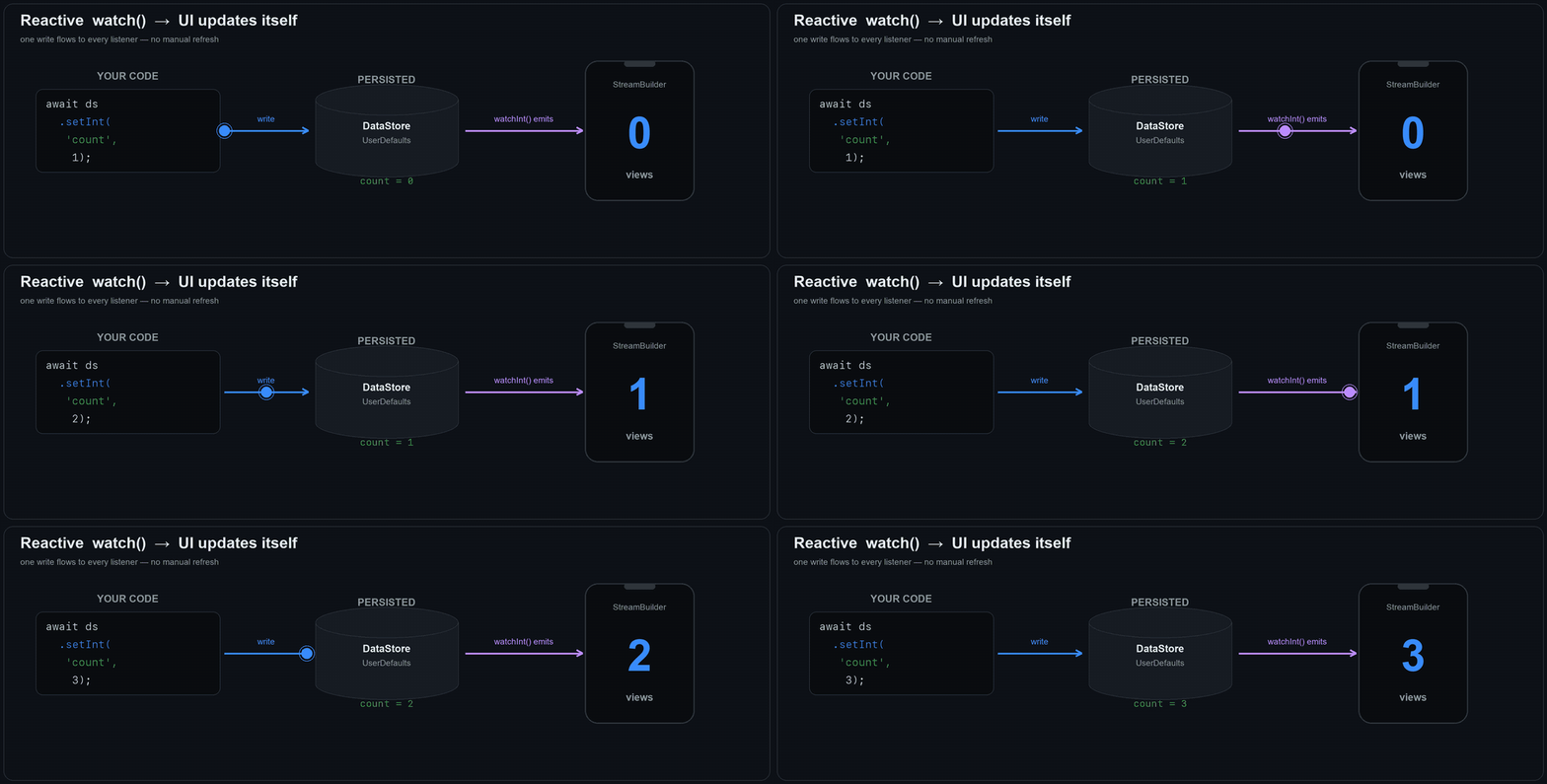
watchBool('darkMode') hands you a Stream that emits now and on every change. Drop it into a StreamBuilder and the UI keeps itself current.
Atomic operations
incrementInt, toggleBool and compareAndSet run as a single native transaction, so two writers never lose an update.
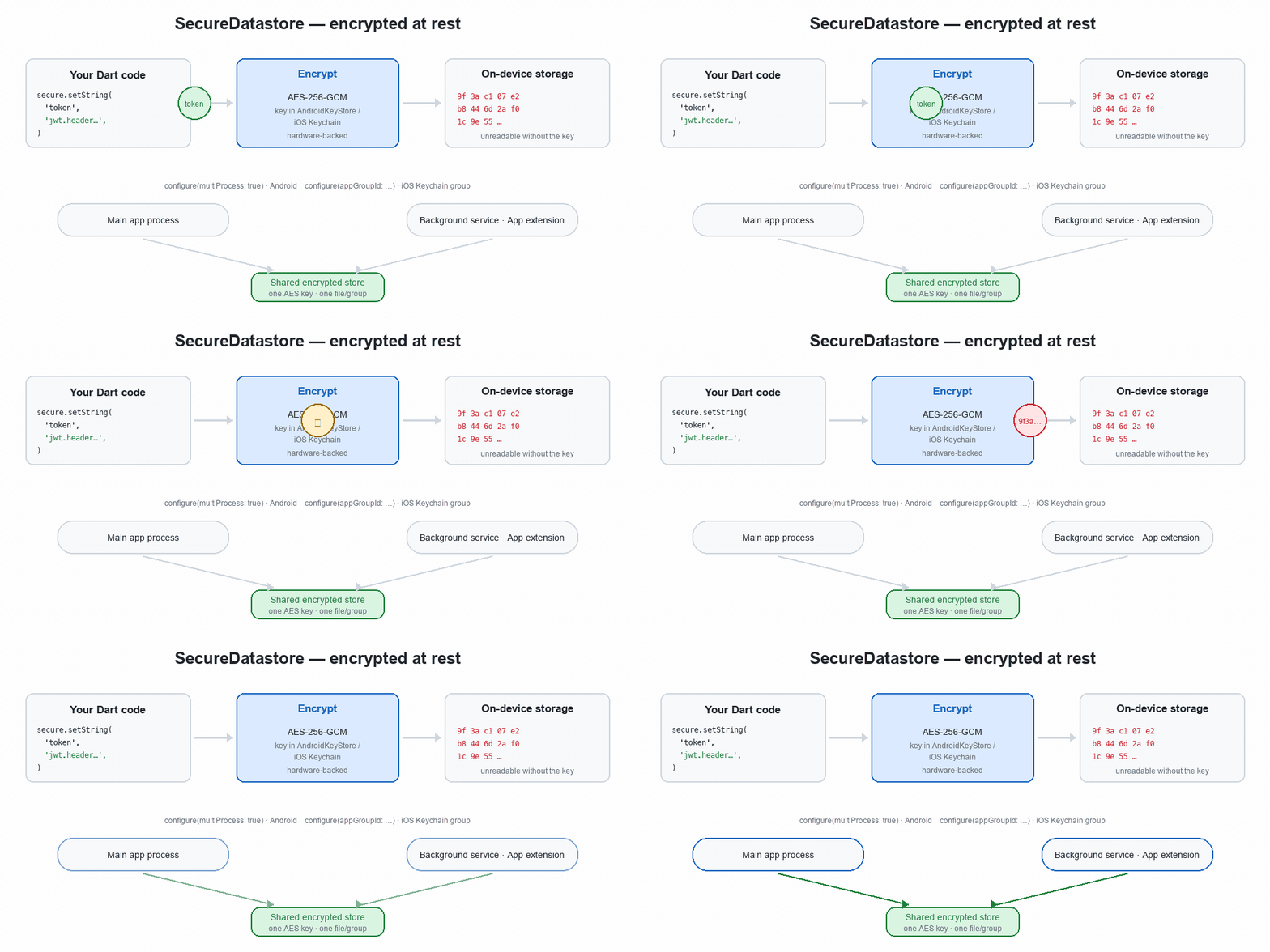
Encrypted store for secrets
SecureDatastore keeps tokens and keys under AES-256-GCM with an AndroidKeyStore key, or in the iOS Keychain.
Generated bridge
The platform channel is generated by Pigeon — no string-keyed method lookups, no hand-written codecs. About 2,400 lines total, zero dependencies beyond Flutter.
Both sides of the bridge
What your call becomes natively
You write one Dart line. Here is the API it lands on, per type, per platform —
so you always know what is actually on disk.
How each Dart type is stored on Android and iOS
Dart type
Read / write
Android · DataStore
iOS · UserDefaults
String
getString / setString
stringPreferencesKey
string(forKey:)
bool
getBool / setBool
booleanPreferencesKey
bool(forKey:)
int
getInt / setInt
longPreferencesKey
integer(forKey:)
double
getDouble / setDouble
doublePreferencesKey
double(forKey:)
List<String>
getStringList / setStringList
JSON-encoded string
Native string array
Uint8List
getBytes / setBytes
Base64-encoded string
Native Data
DateTime
getDateTime / setDateTime
Long — millis, UTC
Int64 — millis, UTC
Map<String, dynamic>
getMap / setMap
JSON-encoded string
JSON-encoded string
Every getter returns null when the key is absent. DateTime
is always stored and returned in UTC — call .toLocal() if you need
wall-clock time.
Android
Minimum API 21 (Android 5.0) · API 23 for the secure store
Backed by androidx.datastore:datastore-preferences with Kotlin coroutines.
Every operation runs on Dispatchers.IO, so nothing touches the UI thread and nothing can ANR.
Stored at files/datastore/native_datastore_prefs.preferences_pb.
A ReplaceFileCorruptionHandler is installed: if the OS kills your process mid-write, the store recovers as empty instead of throwing on every call forever after.
Secrets use AES-256-GCM with an AndroidKeyStore key, hardware-backed where the device supports it.
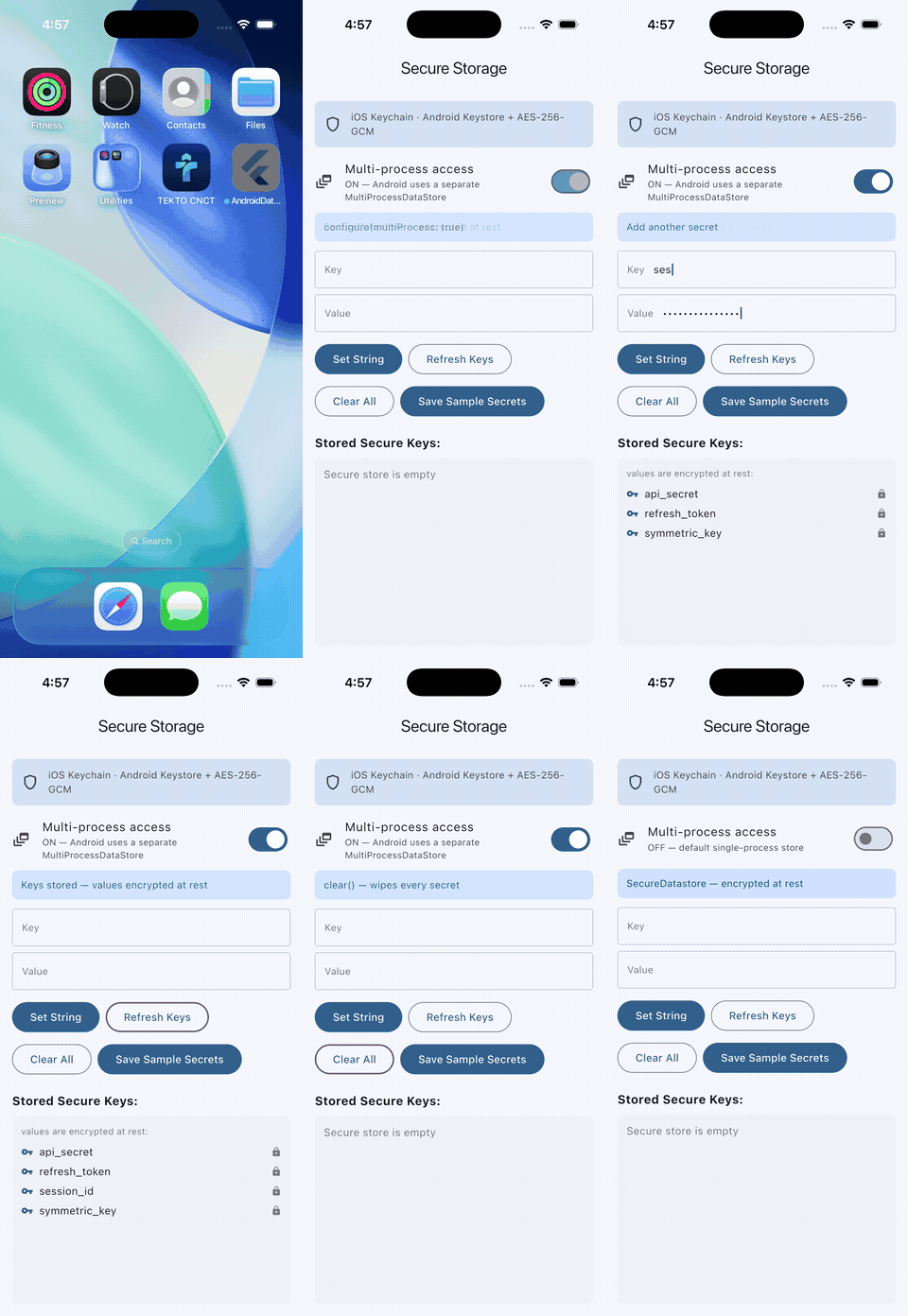
Multi-process access is opt-in for background services.
iOS
Minimum iOS 13.0
Backed by UserDefaults.standard, with every key namespaced native_datastore. so it cannot collide with yours.
String lists and Uint8List are stored natively as arrays and Data — no JSON encoding tax.
Getters are strict: a stored value of the wrong underlying type returns null rather than silently coercing.
Ships both a Swift Package Manager Package.swift and a CocoaPods podspec, so it builds either way with no configuration.
Includes a PrivacyInfo.xcprivacy manifest declaring the UserDefaults required-reason API for App Store review.
Secrets go to the Keychain, shareable with app extensions via an App Group.
The whole surface
Cheat sheet
Copy, paste, adapt. Every call below is the real signature.
final ds = NativeDatastore();

// Write and read — getters return null when the key is absent
await ds.setString('username', 'sudhi');
final name = await ds.getString('username');      // 'sudhi'
await ds.setBool('darkMode', true);
await ds.setInt('loginCount', 42);
await ds.setDouble('rating', 4.8);
await ds.setStringList('tags', ['flutter', 'dart']);
await ds.setBytes('avatar', bytes);               // Uint8List, up to 1 MiB
await ds.setDateTime('lastSeen', DateTime.now()); // stored as UTC
await ds.setMap('profile', {'level': 5});         // any JSON-able map

// Observe a key as a Stream
ds.watchInt('loginCount').listen((v) => print('count = $v'));

// Atomic updates — safe when several writers race
await ds.incrementInt('loginCount');              // returns the new value
await ds.decrementInt('lives');
await ds.toggleBool('darkMode');
await ds.compareAndSetString('status', expected: 'pending', value: 'done');

// Query and delete
await ds.containsKey('username');                 // bool
await ds.getKeys();                               // List<String>
await ds.getAll();                                // Map<String, Object>
await ds.remove('username');
await ds.clear();

// One-time import from the shared_preferences package
await ds.migrateFromSharedPreferences();

// Secrets — encrypted at rest
final secure = SecureDatastore();
await secure.setString('refresh_token', jwt);
final token = await secure.getString('refresh_token');
SecureDatastore
Tokens don't belong in plain storage
The regular store does not encrypt. For refresh tokens, API keys and
anything else worth stealing, use SecureDatastore — same
call shapes, ciphertext on disk.
Android
AES-256-GCM with a key minted in the AndroidKeyStore, hardware-backed where the device allows it. A fresh 96-bit IV per write. Requires API 23+.
iOS
Keychain Services with kSecAttrAccessibleAfterFirstUnlockThisDeviceOnly — never backed up, never migrated to a new device.
Surface is deliberately small: String and Uint8List,
plus remove, clear, getKeys,
containsKey. Values cap at 1 MiB.
Plaintext in, ciphertext on disk — the key never leaves the platform keystore.
Cost of a call
Reads are cheap. Encryption isn't free.
Throughput per operation, higher is better. The split is the point: every
regular-store call outruns every secure-store call, and all eight clear
thousands of operations per second.
Regular storeSecure store
Benchmark throughput by operation, in operations per second
Operation
Throughput
Ops/sec
Mean µs
regular getString
25,044
39.9
regular getInt
24,616
40.6
regular setString
5,828
171.6
regular setInt
5,272
189.7
secure getBytes
4,972
201.1
secure getString
4,750
210.5
secure setBytes
1,833
545.6
secure setString
1,570
636.9
Illustrative, not a spec. Measured on an iOS simulator (iPhone 17 Pro,
debug build), 300 iterations per operation after warm-up. Real devices,
release builds and Android hardware will differ — often substantially. Run it
yourself: cd example && flutter run -t lib/benchmark_main.dart.
On a real device
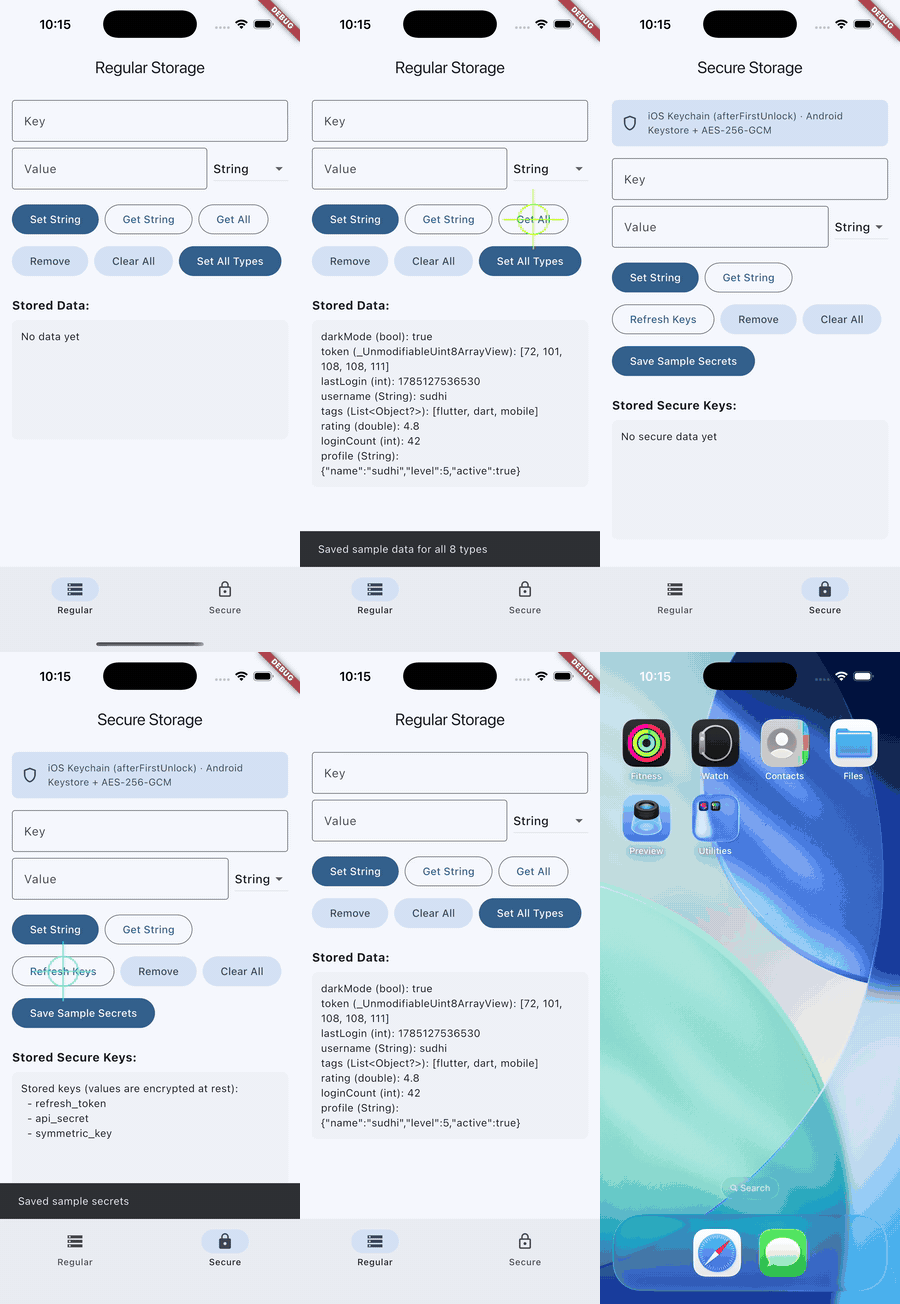
The example app
Both stores, every type, running on hardware. Clone the repo and
flutter run from example/.
Regular store — writing all eight types, then reading them back.Secure store — saving secrets, listing keys, clearing. Values stay encrypted at rest.watchInt() pushing a change straight into the UI — no manual refresh.
Three steps
Start writing keys
Add it
flutter pub add native_datastore
No Gradle edits, no Info.plist keys, no manifest changes.